Assessing Your Event Requirements
Send us a booking enquiry with your event details — audience size, date, location, and what you hope to achieve. If you need audio-visual equipment or coordination support, we can assist with that too.
From setup to results in minutes — here's everything you need to know.
The System
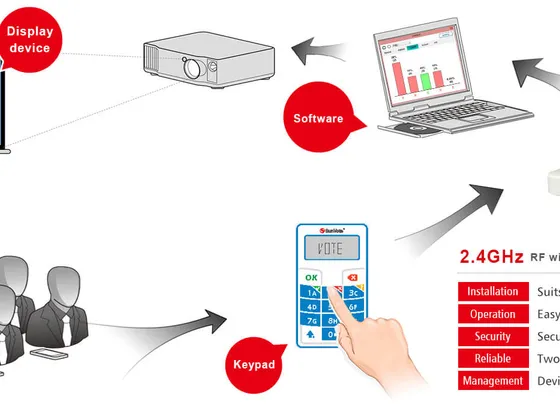
The complete Optivote system is designed to be portable, plug-and-play, and seamlessly integrated with your existing PowerPoint workflow.
The Process
Five clear steps from enquiry to custom report — our team handles the technical side so you can focus on your audience.
Send us a booking enquiry with your event details — audience size, date, location, and what you hope to achieve. If you need audio-visual equipment or coordination support, we can assist with that too.
Prepare your own slides in PowerPoint, or commission us to build the deck for you based on your brief. Your presentation is then integrated with the Audience Response System for real-time scoring.
On presentation day our technician sets up the computer, connects it to the audio-visual equipment, and runs a full test-pass to ensure everything is flawless before your participants arrive.
Voting remotes are distributed to participants. When a question slide appears, a countdown timer activates. Results appear at the push of a button — percentages, scores, and real-time leaderboards.
After your event, custom reports are generated from the collected data. All reports export to Word or Excel, giving you the analysis and insights you need for informed decisions.
Request a free demonstration and see it live — the rest is up to you.